Team Chat OMiro
Ideas and flows on a shared whiteboard
OMiro is the OneMarketer whiteboard: an infinite canvas to draw flows, diagrams and brainstorms live with your team, inside Pulso projects and TeamChat channels.
Talk to an expert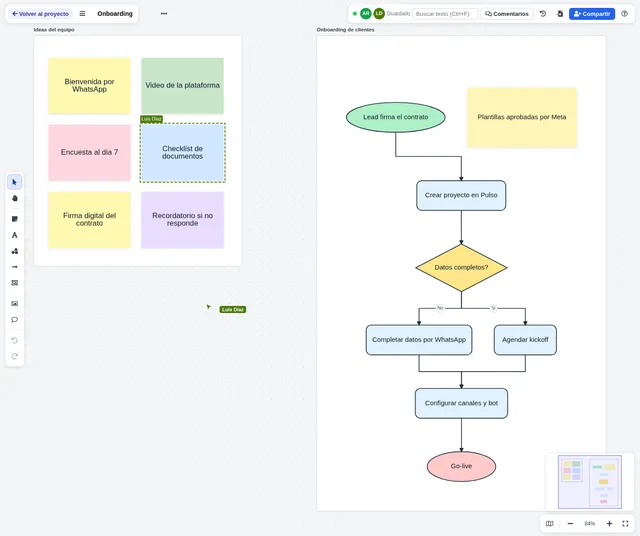
We have advised major brands in 16 countries




































Why your team needs OMiro
-
Everyone on the same board
Named cursors, instant changes and who is online, with nothing to install.
-
Next to the project
Each Pulso project and each TeamChat channel has its own boards, logged in the project history.
-
Invited customers
Share it with a guest link: view, comment or edit, with an email code and an expiry date.
-
OMNia draws with you
Ask OMNia to read a board or draw a diagram in a new frame, without touching what is there.
How it works
- 1
Open the board
From the Pulso project or with the board button in a TeamChat channel header.
- 2
Draw as a team
Notes, shapes, connectors, images and frames, with everyone’s changes live.
- 3
Comment and invite
Comments with @mentions and guest links for your customers.
- 4
Save versions
Named versions you can restore, and export to PNG or JSON.
Features
-
Shapes and notes
Rectangles, diamonds, ellipses, cylinders, sticky notes, text and named frames.
-
Connectors
Arrows attached to elements, straight, elbow or curved, with labels and line styles.
-
Live collaboration
Other people’s cursors, selections and changes instantly, with autosave.
-
Comments
Threads on any element with @mentions notified in TeamChat and a Resolve button.
-
Guest links
View, comment or edit, with expiry, an email code and a list of allowed emails or domains.
-
Versions
Save a named version and restore any of them in one click.
-
OMNia on the board
OMNia reads a board to explain or summarize it, and draws tidy diagrams in a new frame.
-
Import and export
Import boards from Miro and export to PNG or JSON to bring them into another board.
Use cases
-
Bot and flow design
Draw a bot or campaign flow with the customer before building it.
-
Customer workshops
Requirements gathering with the invited customer commenting on the same board.
-
Brainstorming
Color-coded sticky notes to sort the team’s ideas and priorities.
-
Internal processes
Process and architecture maps next to the project or the team channel.
Frequently asked questions
Do I need Pulso to use OMiro?
Project boards use Pulso permissions. Boards in a TeamChat channel can be edited by every channel member, with no Pulso access needed.
Can I invite a customer?
Yes. Share creates a guest link (view, comment or edit) with an expiry date; the guest signs in with a code sent to their email.
Can I bring my Miro boards?
Yes. Paste the board link and OMiro imports the whole board or one frame, with shapes, notes, text, images and connectors.
What does OMNia do on a board?
It reads the board to explain or summarize it and draws diagrams in a new frame. It never deletes or moves anything and saves a version first.